





 Scan with your phone to install Tellu
Four small tools many of you asked for, useful on very ordinary days: a student letting her parents know she reached her dorm, friends agreeing on a café, a freelancer looking for an address a client sent two weeks ago.
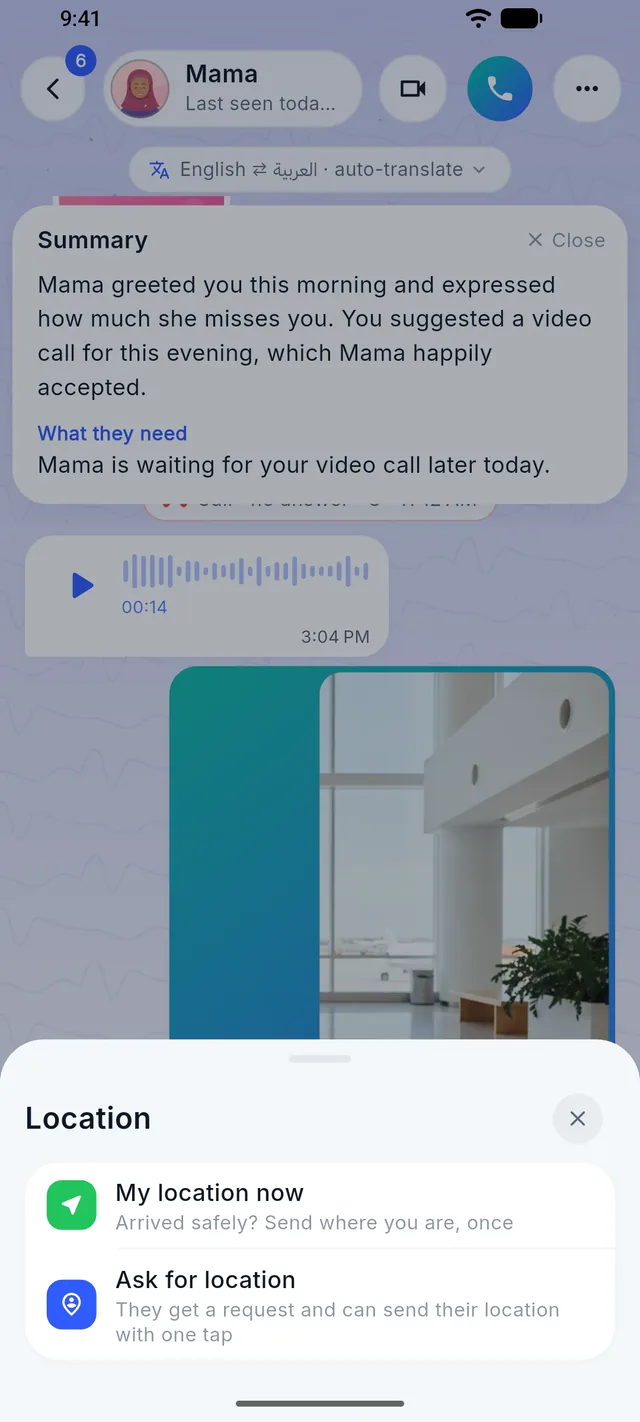
Location: send it or ask for it
In a chat, tap + → Location:
- My location now: Tellu reads your location once and shows you the city before sending. It arrives as a map card with an Open in Maps button.
- Ask for location: they get a request with a Send my location button, one tap if they agree, or they can ignore it.
- An address from Google Maps: in Maps tap Share → Tellu → choose the chat.
Starred messages ⭐
Long-press a message → Star. Find everything you starred, from all chats, with the ⭐ button at the top of Messages; tap a message and the chat opens right at it. A booking number, an address, your grandmother’s recipe: no more scrolling.
Starred, archive & locked chatsPlus disappearing messagesOpenArchive
Long-press a chat → Archive chat and it moves to Archived at the top of Messages. It isn’t deleted, and its messages still reach you. Chats from closed Bridges move there by themselves. To bring one back: long-press it → Unarchive.
About
A short line about you, up to 140 characters, from More → Account & verification → About. It shows exactly as you wrote it, in your language, and isn’t translated automatically; visitors who speak another language see a Translate button.
Privacy
No tracking and no live sharing: your location is only read when you tap. In an encrypted chat, the location stays end-to-end encrypted.
More on keeping your chats tidy on the Organize page, and on location on the Location page.