





 Scan with your phone to install Tellu
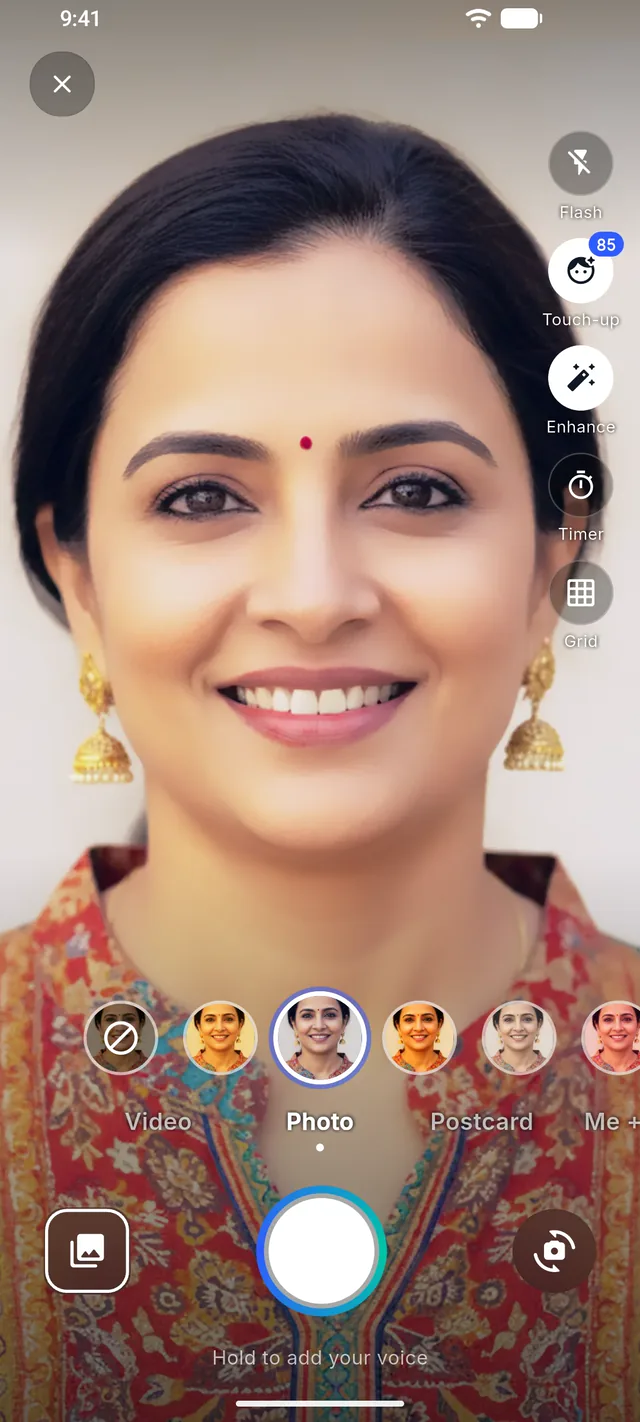
You want a nice photo to send to your mom, a friend or a travel companion, without looking like someone else. With this update the Tellu Camera shows you the filter and the natural touch-up live, before you take the photo, not after.
Nine filters you see live
Open a chat and tap + → Camera, then swipe across the screen to change the filter: Golden, Cool, Vivid, Soft, Rose, Cinema, Night, Vintage and Mono. You see each one on the live picture before you press the shutter, and you can long-press the filter to adjust its strength.
A natural touch, not a different face
Touch-up gives you a “Natural touch” in levels: Light, Medium, or Custom, where you set skin smoothing, face glow and hiding blemishes. Enhance improves light and color, and you notice it most somewhere dark. The camera also has a Timer and a Grid for a tidy group photo.
What we don’t do
We never change your skin tone or the shape of your face, and skin texture and freckles stay. The idea is that you look like you, in your best light.
In video calls too
The same nine filters, along with Touch-up and Enhance, are in video calls under Effects. Every call starts without a filter, so there are no surprises from one you left on yesterday.
Privacy
All of this runs on your phone, with no internet needed, and your photos aren’t sent to Tellu for it. When you send a photo, we remove its location and camera data.
More about the camera and its modes on the Tellu Camera page.