





 Scan with your phone to install Tellu
Sometimes you know what you want to say but not how to say it: a message to an employer, an apology to a friend, a reply in a language you don’t speak well. Sometimes you come back to a long chat and don’t know where to start. So we added AI tools that help you, and never decide for you.
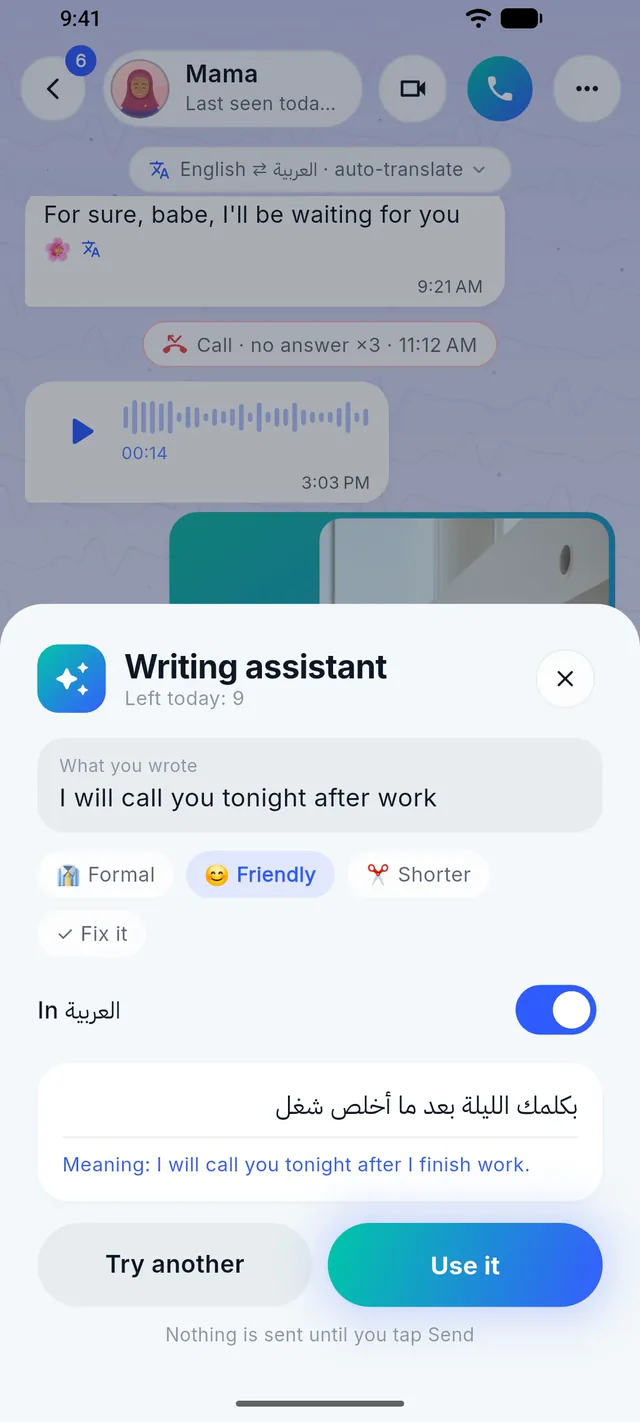
Writing assistant
Write your message, tap Improve above the message field, and choose Formal, Friendly, Shorter or Fix it. The new wording can come in your friend’s language, with its meaning in yours so you know what you’re sending.
Smart mediator
From the chat menu choose Summary & suggested replies: you get a summary, what the other person needs from you, and suggested replies you tap to edit and then send. Handy for a freelancer with a talkative client, or for anyone back from a trip to a pile of messages.
Writing assistant & smart mediatorThe right tone, summaries and reply ideasOpenTranslation in calls (Beta)
Tap Translate during a call with a Tellu user and see what they say written and translated on your screen. It’s written translation only, and it can make mistakes with noise or fast speech.
Privacy
- Nothing is sent until you tap Send.
- To create a summary or a rewrite, the chat’s recent messages or your draft are sent to our AI provider, and Tellu doesn’t store them. Since then, Tellu also asks for your consent before the first use, and you can withdraw it in Privacy settings.
- These tools have a daily limit, and they don’t work in encrypted chats.
More on the Assistant page.